Your first 2D game
In this step-by-step tutorial series, you will create your first complete 2D game with Rebel Editor. By the end of the series, you will have a simple yet complete game of your own, like the image below.
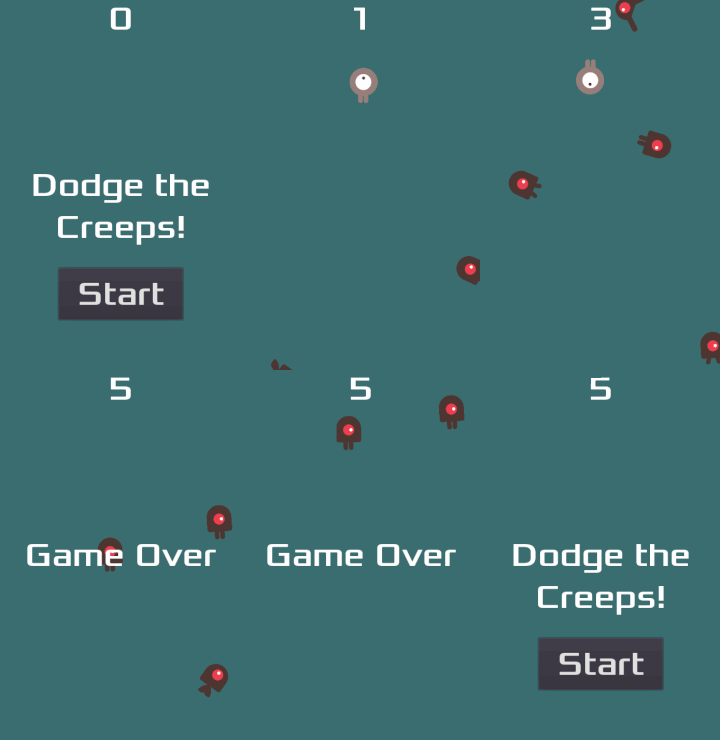
You will learn how the Rebel Editor works, how to structure a project, and build a 2D game.
Note
This project is an introduction to the Rebel Editor. It assumes that you have some programming experience already. If you're new to programming entirely, you should start here: Scripting languages.
The game is called "Dodge the Creeps!". Your character must move and avoid the enemies for as long as possible.
You will learn to:
Create a complete 2D game with the Rebel Editor.
Structure a simple game project.
Move the player character and change its sprite.
Spawn random enemies.
Count the score.
And more.
You'll find another series where you'll create a similar game but in 3D. We recommend you to start with this one, though.
Why start with 2D?
3D games are much more complex than 2D ones. It would be best if you stuck to 2D until you understood the game development process and how to use Rebel Editor well.
If you're an experienced programmer,
you can download a completed version of this project here:
Dodge the Creeps
If you're an experienced programmer,
you can download a completed version of this project here:
Dodge the Creeps
If you're an experienced programmer,
you can download a completed version of this project here:
Dodge the Creeps
Prerequisites
This step-by-step tutorial is intended for beginners who followed the complete Getting Started.
We prepared some game assets you'll need to download so we can jump straight to the code.
Download Dodge the Creeps Assets.
Download Dodge the Creeps Assets.
Download Dodge the Creeps GDNative Assets.